Archive for the ‘HYPERTEXT’ Category
Tuesday, February 24th, 2009
Now that I’m feeling all cocky and proud of myself for finally learning how to get something working online, I’m more interested in pursuing the hypertext path of narrative. Just the idea that maybe somebody would read my work, would have the ability to access it, makes it a viable format for any efforts put into it. As with linear narrative, there has to be an outlet for work unless all you’re writing is a secret diary that you don’t want anyone to find.
While I’ve got a long way to go yet on learning to manipulate the hypertext environment, I’m beginning to find my way round enough to feel comfortable with the idea of devoting a longer narrative to its possibilities. Even as I straddle the simple stuff like colors and order and layout, the more intriguing concept of images and animation, or film backgrounds and audio are already lobbying for my attention. With A Bottle of Beer, there is such an obvious call for visuals–despite my best attempts as a writer to paint background and movement with words. I envision the long road that runs by Yolanda’s small house, disappearing into the sunset. I see the man running into the picture as the mountain shadows lengthen and reach towards her. I see the evening darken into dusk, hear the creak of her rocker on the porch, the night prowling of coyotes and the rush of a scorpion across the hot sands.
So that’s what’s brewing in my mind even as I get ridiculously self-satisfied in learning to manage a thin line of border around text. It’s just a step towards an intersection of paths up ahead; sort of a living, working hypertext.
Tags: CODE
Posted in CODE, HYPERTEXT | Comments Off on HYPERTEXT & CODE: Mixing Mediums
Tuesday, February 24th, 2009
Well, I may not have done it the proper, clean way, but I do have a decent css sheet made up for A Bottle of Beer, along with the necessary changes made in the individual pages made via html. Some of these changes may have an easier manner of being handled in the stylesheet, as far as the link colors being different based on random purpose, the corresponding spaces having a different text color, and the basic links setup with the arrow symbol, and I hope to sort that out as I approach a more complicated hypertext project.
Things I still need to do with A Bottle of Beer: find the method of adding space on the top of the page (margin? padding?); put a back-arrow to match the forward basic link (can figure out how, just don’t know if it’s worth doing–though definitely worth knowing how) and to move the forward-arrow to align right; aligning and positioning of titles, text, etc.; checking out tables or columns so that I can figure out how to place several rows of text or images.
I feel pretty good about what I’ve done so far, though it’s taken me forever to learn and must seem freshman-level to folks who’ve done this and find it easy.
Tags: CODE
Posted in CODE, HYPERTEXT | Comments Off on HYPERTEXT & CODE: Almost done
Tuesday, February 24th, 2009
Just wrote up and initiated a border around the text–the complete block of text, not each paragraph–in a test stylesheet!
I’m so excited as the steps start coming together to create a dance. This is the code I stuck into the stylesheet, and all I have to do is get some padding or margins in there:
body {
border-style: solid;
border-color: #FFFFFF;
border-top-width: 2px;
border-right-width: 2px;
border-bottom-width: 2px;
border-left-width: 2px;
}
And, I think I have padding…
Tags: CODE, HYPERTEXT, STORYSPACE
Posted in CODE, HYPERTEXT, STORYSPACE | Comments Off on CODE, HYPERTEXT & STORYSPACE: Huzzah! I got borders!
Tuesday, February 24th, 2009
Seeking, trying, learning, doing; a long and tedious process for but the simplest thing; simple, that is, if you know what you’re doing.
Got it though; in changing the basic links to the arrow, it bothered me more and more to see those links all in red when this story–and likely this is one of few hypertexts that will be so utterly dependent on link-color to help tell a story–remained red.
So I explored a bit and found that a few simple tags could be entered within the html templates (individually for now) to change the text to what I wanted. For the links (from the main narrative line to the ‘asides’) I placed font code within the link code:
<p>She half-awoke angrily, as if someone had <a href=”https://susangibb.net/blog2/wp-content/uploads/NewBoB/Shoved.html”><font color=”#00ff00″>shoved</font></a> her.</p>
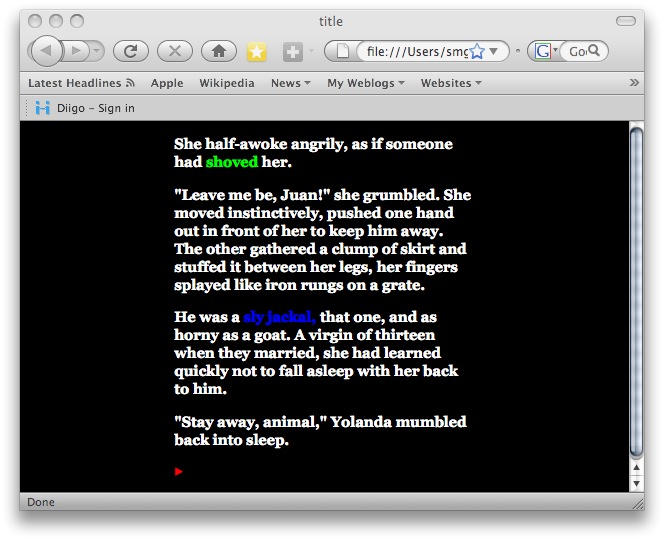
Then, for the ‘aside’ lexia itself, which is coded green from the above link “shoved”, I placed the following code at the beginning of the BODY heading, closing the tag with the final </font></p> in the lexia:
<BODY>
<p><font color=”#0000ff”>
<p>Not a good night for hunting, the moon full tricky with shadows and the jackal appeared double his size. His yellow grey fur was matted with burrs and dried blood. He stunk of three days of mating with females stringy and old. But he also was long past his prime. His tail hung in tatters, one rear leg was shriveled and slow, many of his teeth had rotted in pain and his right ear hung folded in half.</p>
<p>Out here, life was hard for the healthy. For the old, it was keep moving or die.</font></p>
To come up with this:
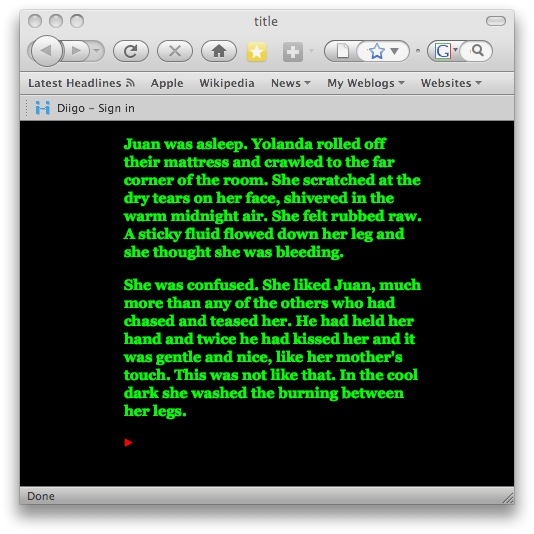
And though these changes aren’t being made on-site, but rather on-desktop for now, they’ll be uploaded as soon as I figure out borders. Ain’t life grand?
Tags: HYPERTEXT, STORYSPACE
Posted in BLOGGING, CODE, HYPERTEXT, SOFTWARE & TOOLS, STORYSPACE | Comments Off on CODE, HYPERTEXT & STORYSPACE: Applied Color
Tuesday, February 24th, 2009
Thanks to Chris I’m changing the basic links to ▶ from the idea of linking from the final word in each writing space. It picks up the color from the css sheet and works perfectly. But then we enter the shadowy world of browser perception.
Luckily I have pc’s around the house (and only one Mac–so far) to pick up on such things. While the symbol comes out looking like an empty box, that’s fine. But what I’ve learned is that in future work the site must also be browser-readable by those using other than Firefox, and while I don’t have the link ready here, there are places, including the site where I got the symbol, that can validate this.
Tags: HYPERTEXT
Posted in BLOGGING, CODE, HYPERTEXT | Comments Off on HYPERTEXT & CODE: A Shadowy World
Monday, February 23rd, 2009
…a block, a dot; something that, with a single keystroke, will act as a hyperlink at the end of lexia text to move to the next logical lexia without the need for “next” or “basic links” or as I have been doing, using the last word of the space. I’m thinking of going back and using an arrow (–>) which is a common sign for moving forward in both hypertext and IF, but it would be really neat to have something with a ‘heavier’ weight, particularly when using colored text and backgrounds.
There’s likely something available in the library of symbols in either Pages or Word, but as I’ve found out with the ene (or Spanish nyah-sound of Señora) they do not compute in the export of Storyspace into the html templates.
So I’m looking for a blob of color, fairly large, like a drop of blood that leaves a trail to follow to the murderer.
Tags: CODE, HYPERTEXT, NEW MEDIA
Posted in CODE, HYPERTEXT | 2 Comments »
Sunday, February 22nd, 2009
Since I was finally able to have a certain amount of success in making the internet play nice with Storyspace (it always did, it’s just that I stubbornly tried to make things work without coming right out and yelling for help, as is my way) and tweak things out a bit in simple things like color and font, I went ahead and modified A Bottle of Beer in the My Work Page. But there’s still much to do.
This piece is linear, with links to “asides” that come right back to the main path. This is because it was written in a particular form, that offered by the Hypertextopia online site. While the format appears simplistic, it does provide a certain service in that it fulfills a gap between the more complex structure of something like Storyspace or interactive Flash and the stricter confinements of straight text (though nothing’s stopping you for skipping around in the book). To be honest, the largest appeal of Hypertextopia to me was the flashy graphics. So with my true whore’s heart of loyalty and love of dazzle, in transferring A Bottle of Beer into the Storyspace software and learning how to export it here at my website, the first thing I wanted to do was paint the hot colors of story against a black backdrop. This took me several days of creating new html templates and css sheets until I have it somewhat like what I want.
Next comes some fine tuning such as borders and frames and making each link take back on its original color that had formed a path of meaning of its own, and some fixing of glitches like the extra spaces between sentences that show up as E’s and the Spanish accented letters which html translated into some God-awful-scary voodo signs.
Tags: HYPERTEXT, STORYSPACE
Posted in HYPERTEXT, STORYSPACE | Comments Off on STORYSPACE & HYPERTEXT: A Bottle of Beer
Friday, February 20th, 2009
This morning I entered and resized an image in the html template, changed text into a headline, uploaded the new single page along with the image file, and voila! What was that?
Many thanks to Steve Ersinghaus for the guidance and samples, Mark Bernstein and Eastgate for the original Storyspace templates, and Chris Klimas for suggestions. While I still don’t truly understand it all, it’s obvious that maybe I can handle it with a bit more experience.
Still getting a good book on html, css, and the like now that I’m excited about Storyspace and digital narrative again.
Tags: HYPERTEXT, STORYSPACE
Posted in CODE, HYPERTEXT, STORYSPACE | Comments Off on STORYSPACE & HYPERTEXT 7 CODE: Slowly, but success!
Friday, February 20th, 2009
Who won the IF Archive CSS Competition with his design. Chris is also a talented storyteller at his site Gimcrack’d.
Posted in HYPERTEXT | Comments Off on HYPERTEXT: CSS Congratulations to Chris!
Thursday, February 19th, 2009
Somehow managed to get some minor changes–yet major steps for me–done on testing out a format for a hypertext piece. So after a couple of 18-hour days (oh, it’s been a week?) I took a break on the justification of needing to learn sticking in images.
More than anything, I love Photoshop.


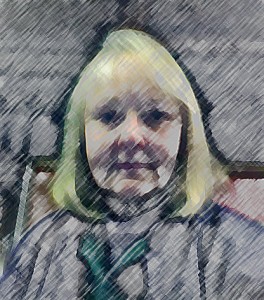
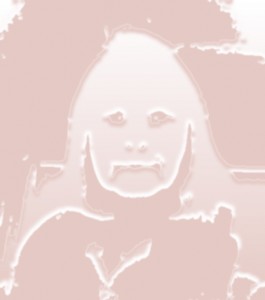
I’ve always loved playing with faces.
Posted in HYPERTEXT, NEW MEDIA | Comments Off on NEW MEDIA & HYPERTEXT: Break time

 The Lost Children: A Charity Anthology