Archive for the ‘HYPERTEXT’ Category

HYPERTEXT & CODE: Position

Monday, March 2nd, 2009


Really should–and probably will–form a new category for HTML and CSS, but since the main reason for my getting into it is all because of hypertext writing I suppose for now it all relates.

Just managed to move beyond the problem of the wandering center column of a three-column design format (figure I’ll work out the horizontal alignment later) which was driving me nuts because I don’t totally know what I’m doing yet. I was able to pin the left column in place while remaining fluid, and the right by pinning it to the right edge, but the center column moved to the left if there was no left column in place. I finally managed with both position: absolute and margins of left: 250px and right: 250px to keep the center column in the center without the sides supporting it.  For now, that’ll work, even though it’s not the cleanest way of doing this and it does limit me to the particular widths until I learn to code around them.

Meanwhile, I have to fix paddings and margin widths and the horizontal positioning before I bother getting more fancy with design.
NEW MEDIA: Never a Case of Either/Or

Monday, March 2nd, 2009


I’ve been checking my stats lately because of the changeover from Typepad to WordPress to see if and why Google searches still point to–and find!–old deleted posts on the Typepad versions of the weblogs. This search caught my eye: “interactive fiction versus storytron which is better.” Undoubtedly, it led the searcher to one of my many posts on either subject and left them there since further links from that web page were supposedly blocked (the files were actually all dumped, but the ghosts of posts still linger in the atmosphere), and since there’s no reasonable way of redirecting from Typepad to the WordPress mirror.

The particular search above gives me the willies; it would seem that the difference is obvious to anyone knowing anything about either project. While in many vague ways Storytron can be connected to IF in the meaning of “interactive,” they are really two separate animals when you consider that IF is largely felt to reference text-based adventure. Chris Crawford didn’t put ten years of his life into Storytron to merely come up with something “better” than interactive fiction. It also seems that a quick visit to the sites–that of Storytron and the many on IF–would reveal immediately that there’s apples and oranges here.

I suppose what bothers me most is not the question, but that an answer would not have been found before following the search that led someone to my site. And then, to be dropped off into the netherworld of impossible redirection because of Typepad’s stubborn manipulation. I wish I had had the foresight and the time to go through all 5500 entries (Spinning and Hypercompendia) to add a forwarding link on each post; I just never thought the old ones would still be floating around out there.

HYPERTEXT & CODE: Fiddlin’ with Design

Monday, March 2nd, 2009


This site for now has become a journal of learning the behind the scenes creativity necessary to bring any hypertext narrative efforts on my part to the process of production and accessibility. In other words, I can write the story, but it’s got to be displayed for public reading and up to now, for me that was a problem.

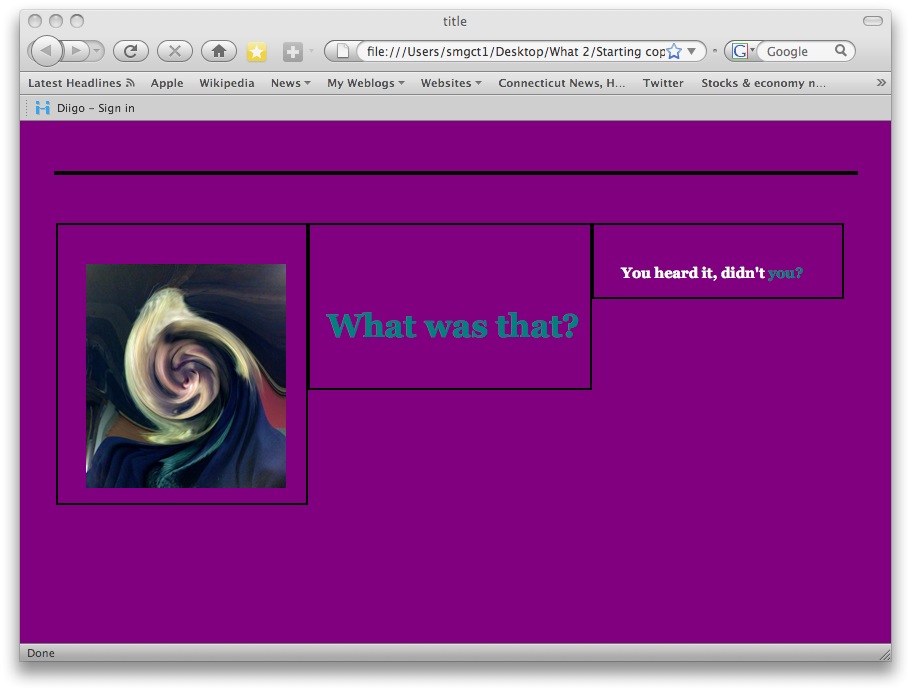
So I got beyond the procedure of exporting Storyspace work into an online site, set up a site that accepts it, and now am working on presentation. So while it may look extraordinarily silly to thems that already knows, this journey is an important one to me–if not for me, and the purple plague picture below this post is just so for a purpose.

I think that working with this short, unfinished piece (What Was That?) is the easiest way for me to learn all the different options available. The purple and aqua color choices are strategically marking this as separate from the more subtle original format. In the post below, the opening space of the piece includes title, image, and text with a hyperlink. I’ve separated each out into separate columns set up for placement–at least vertically; something else may work better to allow horizontal placement as well. And, all three columns are represented–which is not something I really feel I’d be using, but rather single or two at the most–but it does bring up the question of outer margins and spacing so that the borders are separated. I may need to look into going over an 800-pixel body width. Does anybody use 800 anymore?

And the black line at the top: that’s just an empty body border that I’ve since taken out. Hey, I’m sure this won’t be the ugliest hypertext space I produce in my trial and error learning!

HYPERTEXT & CODE: Fun with Columns

Sunday, March 1st, 2009


You gotta love it.
030109h

HYPERTEXT & CODE: And a Monster was Thence Created

Friday, February 27th, 2009


Just as I had turned my head away from transforming all work into XHTML because it’s not a simple case of lower case alone, the books come in!

HTML, XHTML, and CSS for Dummies (Andy Harris) and Head First HTML with CSS & XHTML (Elisabeth and Eric Freeman) are over 900 and 600 pages respectively and though other, better books were suggested, I’ve found that starting on the easy level is sometimes best. After all, if politicos can talk to us like we’re three-year-olds then maybe that’s the best way to get the message across.

HYPERTEXT & CODE: CSS classes

Thursday, February 26th, 2009


No, I’m still muddling through in my own pokey way and draining the brains of a couple friends who know a lot more than I do, but no, I’m not taking classes.  In this case, class means a specific style application to an element a selector. What I was looking to do–and managed in a way, was change text color for certain writing spaces in a hypertext piece. My solution was posted previously, but I knew there had to be a way of taking care of this more easily on the css stylesheet. While I haven’t checked it with IE, it works with Firefox. The only problem, it has to be done (inline) on each paragraph, vs. the embedded style that also works well and is really easier to implement. The sample and the code (in the stylesheet):

022609p.blue {
font-family: Georgia;
font-size: 1em;
color: #0000ff;
font-weight: 700;
padding-left: 25px;
padding-right: 25px;
}

And in the html of the space, for the blue paragraph:

<p class=”blue”>text</p>

HYPERTEXT & CODE: Yay!

Thursday, February 26th, 2009


Found my top margin!

So here’s where I am so far:

022609h

HYPERTEXT & CODE: Update on Color Change Code

Wednesday, February 25th, 2009


It does work; that is, the code in the previous post works fine in Firefox as well as Internet Explorer. This would be easier than inline style code since the entire code is easily pasted in place in entirety, with only the color hex itself needing change (or working production style, plopping all ‘red’ into place, then ‘blue’, etc.).

Then again, I’m sure that there’s even an easier way; likely a designation of class or id or something like p-blue{color:”0000ff;}  in the stylesheet, and the <p-blue>tag in the html.

And no, I didn’t check how this plays with Safari, Chrome. or anybody else.

HYPERTEXT & CODE: Another day, another resolution

Wednesday, February 25th, 2009


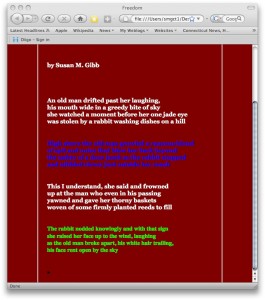
With a bit of help from Chris and some trial and error work on my part, the problem of the colored text not showing properly in those lexias meant to be either all red, all blue, or all green instead of the white text showing up in the Internet Explorer browser has been fixed.

I tried several things, but what worked and was inserted in the <head> </head> section was this:

<style type=”text/css”>
p {
color:#0000ff;
}
</style>

Since these spaces are governed by a css stylesheet, I wasn’t sure what would work and while the inline css code worked with Firefox, I guess IE likes the embedded style above. Didn’t try removing the inline to see if Firefox works with just the above–and will, just to know for future reference–but for now, I’ve left both in with no problems.

HYPERTEXT & CODE: Deflation

Wednesday, February 25th, 2009


Didn’t even think to check the hypertext piece on Internet Explorer since the changes were so elementary.

The code for changing the font color of particular writing spaces doesn’t work! The link color changes do, but the whole body of text in the ‘asides’ remains white despite the simple code of <p><font color=”ff0000″>text</font></p> tag enclosures.

What’s IE looking for? There is a browser-checker online that I’ll check into later. After I’ve finished pouting and grumbling “get with the program. Get a Mac and Firefox for Pete’s sake” into the cosmos.